
Nutrition is the part of coaching clients ask about most, and the part that is hardest to deliver at scale. Programming can be templated. Check-ins can be batched. Meal planning resists both, because a plan that actually works has to match one person’s calorie and macro targets, the foods they like, the foods they avoid, and the week they are actually living in. Build that by hand for one client and it takes an evening. Build it for twenty and nutrition stops being a service you offer.
Meal Plan Generator changes where that work happens. Everfit Nutrition Coaching now builds a client’s full week of meals from the preferences and targets you set, repeats that plan into the weeks ahead, and rebuilds it when a client’s data changes. Three features, one outcome: personalized nutrition coaching that no longer costs you your evenings.
Meal Plan Generator: A Full Week of Meals in One Click
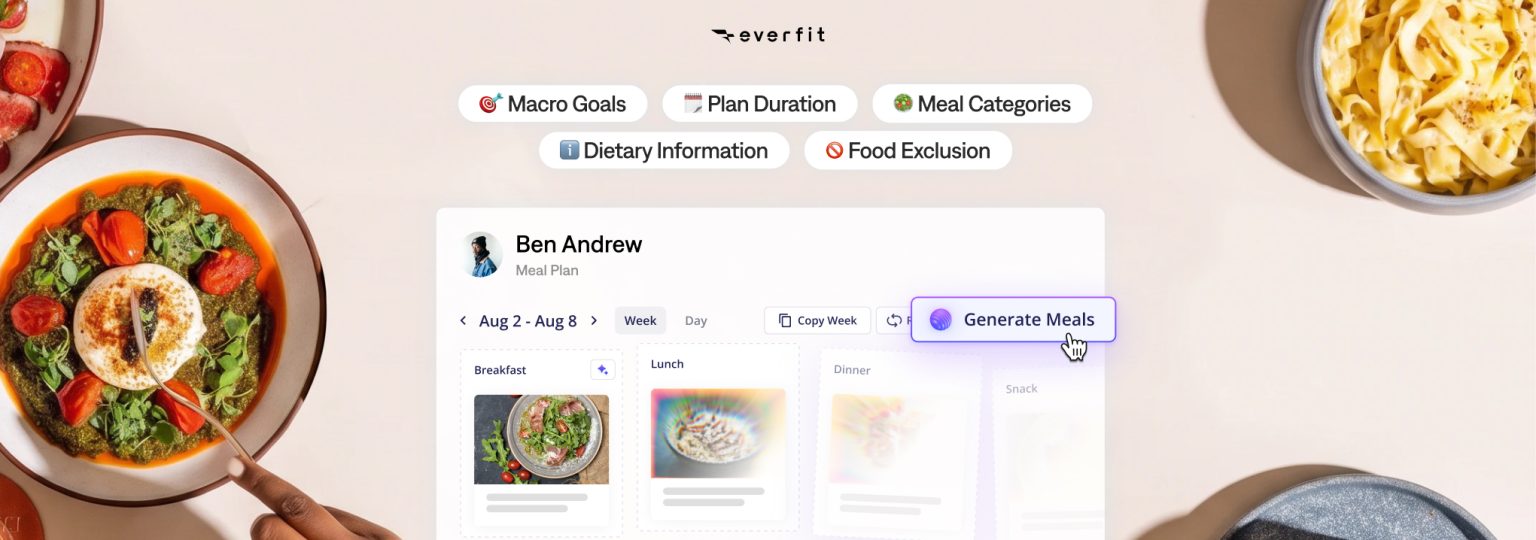
With Meal Plan Generator, coaches can set their client’s macro goals, meal structure, dietary information, and food exclusions once, then generate their whole week in a single click.
Everfit assembles the plan around what’s unique for the client and adjusts the plan, such as portion sizes, so each day lands on the client’s macro targets, rather than handing you recipes that are approximately close and leaving the maths to you.
Your recipes are sourced from your own library, Everfit’s collection of over 15,000 dietitian-approved recipes, or both.
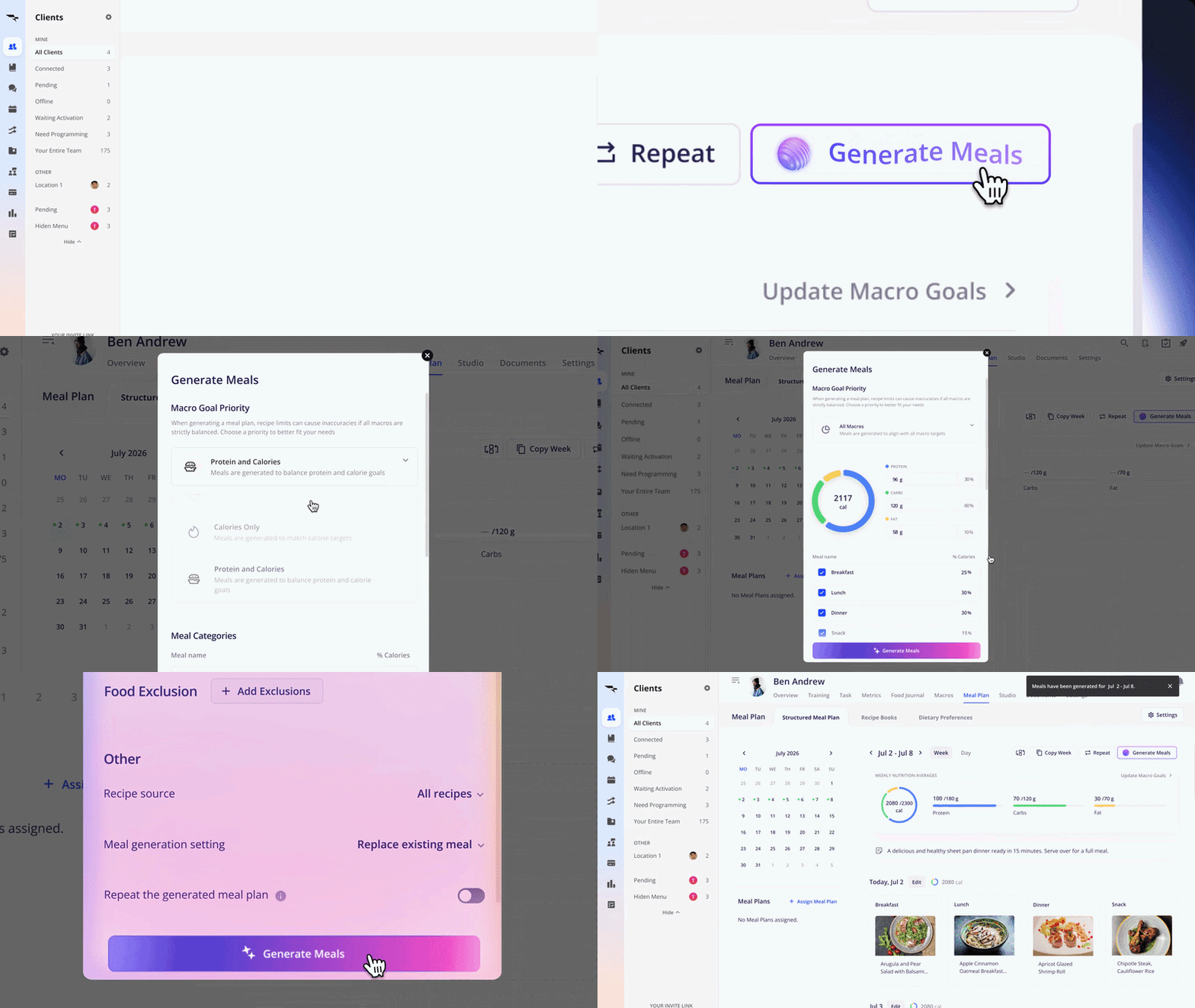
If the first result is not what you had in mind, regenerate it. There is no limit, and you are not stuck with whole weeks either. Regenerate a single day, or a single meal, until the plan matches what you would have written yourself. Learn more about Everfit Meal Plan Generator here
Meal Plan Generator is best when:
- You want to save time in creating meal plans with the right recipes and portions, without calculating each ingredient every time.
- You’re managing a large roster and need plans built fast, at volume.
- For flexible meal plans with many varieties in each meal.
- When a client’s goal changes.
- For new clients, you can add the Nutrition Intake Form to your onboarding flow and turn on auto-generate (which we will introduce later), and a new client’s first plan is built from their answers the moment they submit the form
Repeat Meal Plan: Consistency Without the Rebuild
Most nutrition progress comes from repetition. Clients who eat roughly the same way each week stick with it, and the plan that is already working is usually the right plan for next week too. Rebuilding it every Monday is unnecessary overhead.
Using the Repeat Meal Plan feature takes your templatized week that works and carries it forward. You can repeat until you turn it off, or set a fixed number of weeks to match a training block. You can also adjust any meal in a random week without altering any other week in the sequence.
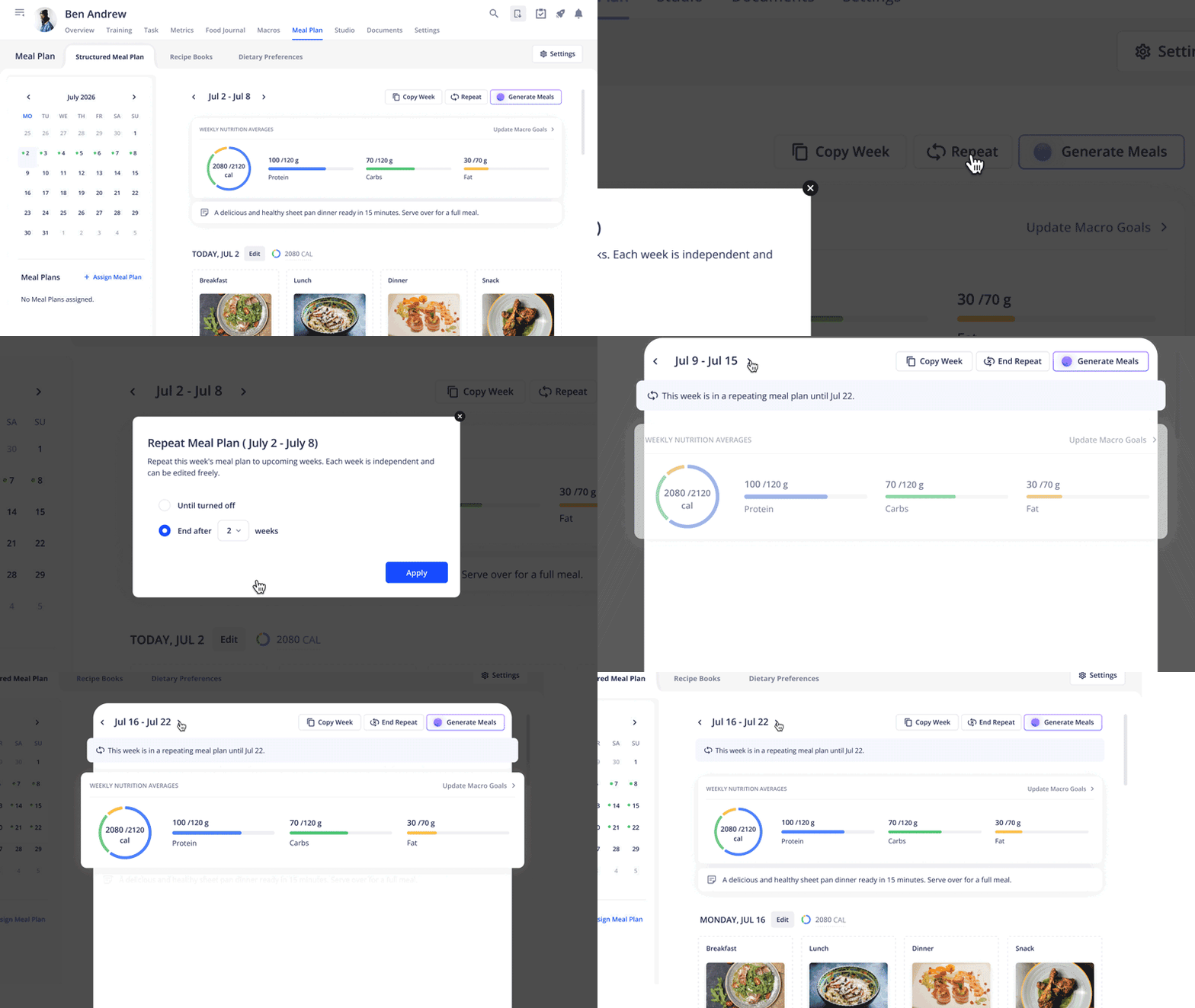
Repeat Meal Plan is particularly useful for:
- Clients who aren’t chasing an aggressive change, a stable weekly rotation works better than a plan that shifts constantly.
- Lower-touch coaching tiers, where the plan does not need to change often but still needs to be there.
See Everfit Repeating Meal Plan in action!
Auto-Regenerate Meal Plan: Plans That Keep Up With Progress
Weight changes, training load changes, goals change, and the nutrition plan should change with them. Doing that manually means a weekly review queue you have to remember to work through.
Auto-Regenerate handles it on a schedule you choose. Assign the Nutrition Check-in Form, pick how often plans should be reviewed, and Everfit checks each cycle for what has actually changed in their response: macro goals, meal categories, and dietary information.
Two details make this usable rather than unpredictable.
- It only rebuilds when something has changed in their form response.
- It will not overwrite a plan you assigned by hand. Anything you built yourself stays exactly as you left it.
On the client side, the experience is quiet and complete. They fill in their check-in, see confirmation that a new plan is being prepared, and the updated week appears in the app they already train in. You do not have to send a thing. Learn more about Everfit Auto-generate Meal Plan
Auto-generate Meal Plan is particularly useful for:
- Progressing clients who are actively changing. Clients who are losing weight, building muscle, or working through a structured block need their macros to track their progress, not lag a week or two behind it.
- Premium 1-on-1 clients. For your highest-touch tier, Auto-Regenerate isn’t about doing less work, it’s about spending your time on the parts of coaching that actually need you.
Your Nutrition Coaching System, All Together
These three features aren’t a menu you pick one item from, they’re stages of the same workflow, and most coaches end up running all three at once across different segments of their roster.
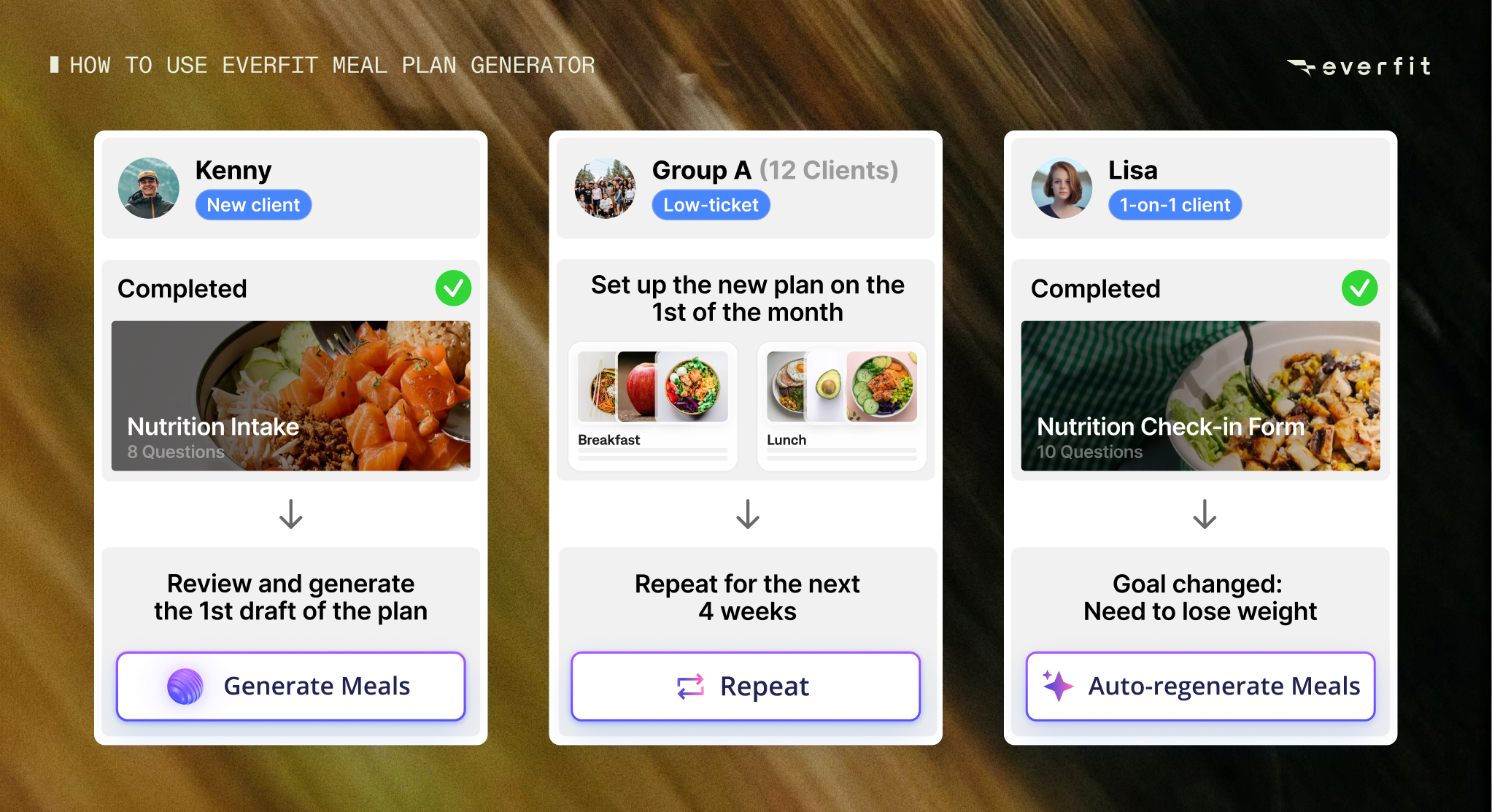
A new client signs up and completes the Nutrition Intake Form during onboarding. Within 15 minutes, you checked their submission, their needs, and the Meal Plan Generator has already built a full week of meals.
Across other groups, you set up Repeating Meal Plan on the first of the month. All your low-touch clients are covered for the next 4 weeks. The only manual touches are the meal swaps for a client who mentioned a food he was tired of.
For the 1-on-1 clients, you assigned the Nutrition Check-in Form every week and set Auto-Regenerate Meal Plan. Their plan rebuilds automatically before their next session if there’s any changes in goal and dietary preference.
Without building each plan from scratch, every client still gets a plan that reflects your judgment, not a generic algorithm’s. That’s the real shape of the system:
- Meal Plan Generator does the heavy lifting whenever a plan needs to be built from scratch
- Repeat Meal Plan keeps a working plan in place without extra effort
- Auto-Regenerate Meal Plan keeps things current for anyone whose numbers are actually moving.
Everfit executes the system you’ve already designed. All you have to do is check, adjust if needed, and ship it.. The expertise stays yours. What disappears is the assembly work.
Also read: How Everfit Nutrition Coaching is better than others?
Watch the live demo of Everfit Meal Plan Generator:
Everfit Meal Plan Generator vs. Generic AI Plans vs. Manual Planning
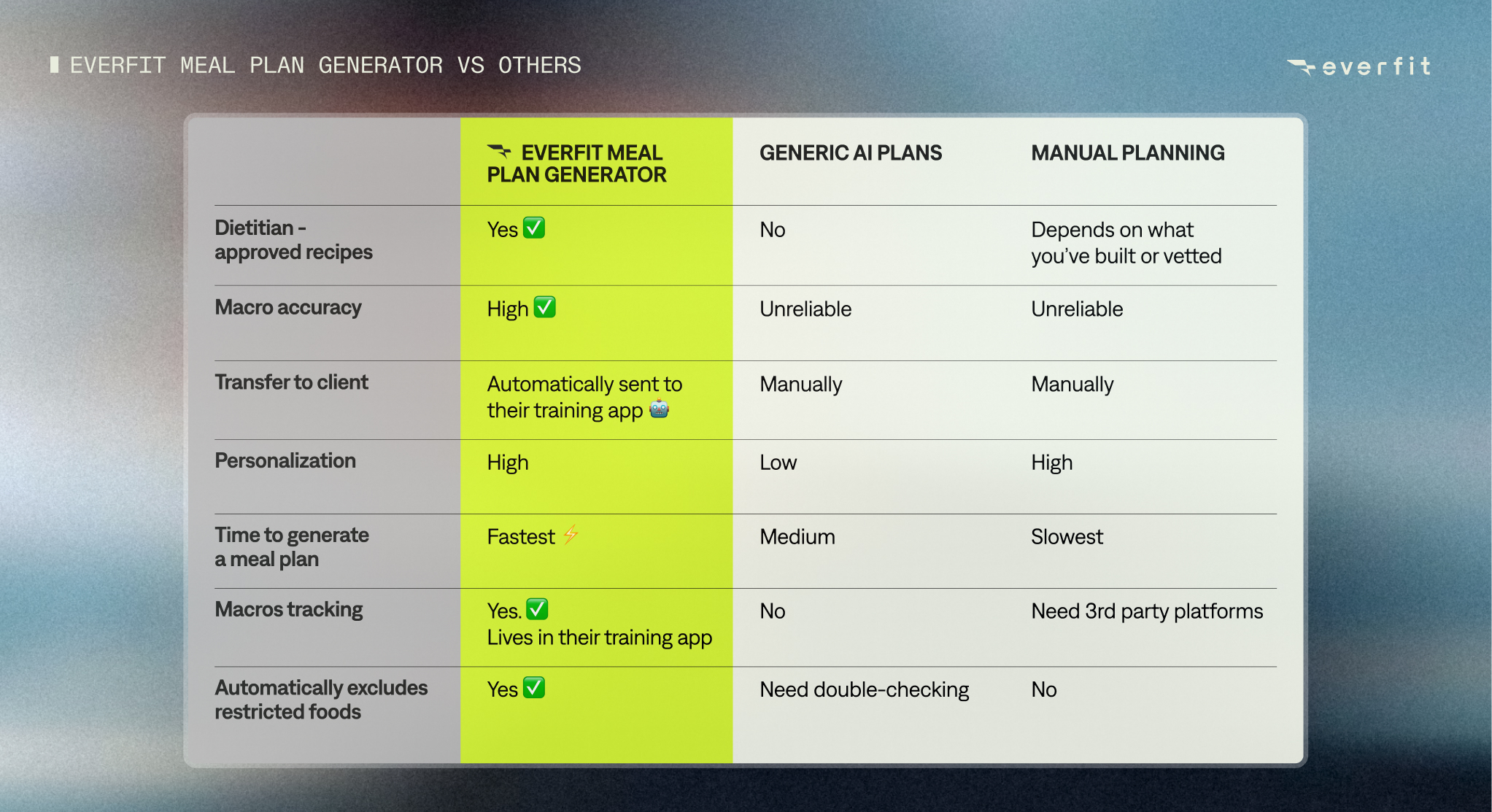
If you’ve ever typed a client’s stats into ChatGPT, Claude, or any general AI bots to get a quick meal plan, you already know the appeal, and the limits. Here’s how the three approaches actually compare once you factor in what happens after the plan is generated.
Getting Started
Meal Plan Generator, Repeat Meal Plan, and Auto-Regenerate are all included in the Meal Plans & Recipe Books add-on, available on any paid Everfit plan, at no additional cost beyond the add-on itself.
Two things worth knowing before your first run. A client needs macro goals set before the generator can build their plan, and Everfit can help you calculate that. If you plan to use Auto-Regenerate, assign the Nutrition Check-in Form at least a week ahead of the target start date, so your client has time to answer and the plan has time to build.
Now, let’s open a client’s Meal Plan tab, set their preferences, and generate their week in just a minute!