
A client texts at 10 p.m. to move tomorrow’s session. Another one doesn’t show up. You find out you double-booked Thursday at 6 a.m. And you’re still juggling a calendar app, a training app, and a payment app to keep it all together. Having the right booking platform fixes most of that.
Here’s the short answer: Everfit is the top pick for personal trainers and small studios that want booking, training, and payments in one app. Calendly and Acuity work well if you only need a simple booking link. Mindbody and Vagaro fit larger studios that run lots of classes. Trainerize suits online coaches who want scheduling tied to their programs. Read on for a breakdown of each platform and tips to help you pick the right one for your business.
1. Everfit: All-in-one booking platform for personal trainers and fitness studios
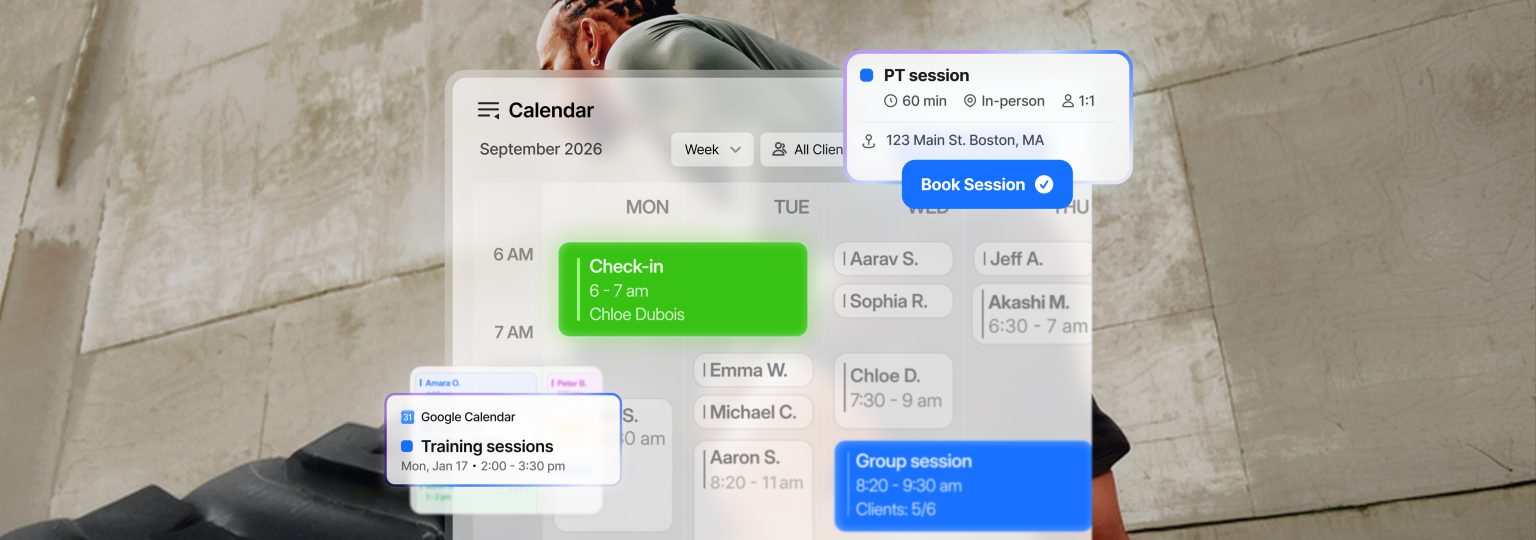
Everfit is a coaching platform used by 430,000+ coaches in 184 countries. Its Booking & Scheduling feature is included in every paid plan and puts your calendar inside the same app where you program workouts, message clients, sell programs, and get paid. Clients book your open 1:1 slots and group classes in the Everfit app using their session credits.
Its biggest strength is cutting no-shows. Clients get a push reminder 1 hour before each session and a reminder email 24 hours before. You decide who can self-book and whether clients can cancel on their own, inside a cancellation window you set. In early testing, coaches saw no-show rates drop to under 10%.
Beyond booking, Everfit also covers workout programming with an AI workout builder, meal plans and AI meal logging (MacroSnap), habit tracking, onboarding forms and check-ins, in-app messaging, payments and packages, on-demand workout libraries, and custom branding.
Best for:
- Personal trainers who want booking, training, and payments in one app
- Hybrid coaches who train clients in person and online
- Small studios and coaching teams that share one calendar
- Coaches who sell session packages
Key booking features:
- Client self-booking for 1:1 session types, with booking windows, buffer times, and start-time increments you control
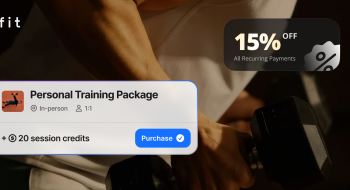
- Session credits that draw down with each booking and load automatically when a client buys a package
- Group sessions with a max-spots limit, so Everfit blocks overbooking. Coaches add clients for now; group self-booking is planned.
- Client self-cancel within your cancellation window, plus late-cancel tracking. Coaches handle reschedules, and clients get notified.
- Video call links for Zoom, Google Meet, or Microsoft Teams, sent in confirmation and reminder emails
- Google Calendar sync that blocks your personal events and adds sessions to a separate Everfit calendar
- Multi-coach calendar: owners and admins manage every trainer’s sessions; trainers only see their own
- Repeating sessions and full booking on the mobile Coach App
Pros:
- What users say: A coach on Capterra (July 2026) wrote that Everfit’s calendar and scheduling features keep everything organized, alongside billing that makes recurring payments seamless.
- Proof in numbers: In early testing, about 25% of sessions were self-booked with little coach action, and no-show rates dropped under 10%.
- Booking is included in all paid plans with no separate booking fee.
- One system: your calendar already knows each client’s credits, payments, and training progress.
Cons:
- Calendar sync works with Google Calendar only.
- Selling packages online needs the Payments & Packages add-on ($9/month plus processing fees).
2. Calendly: Best free booking link for solo trainers
Calendly is a general scheduling tool used by sales teams, recruiters, and coaches. You share a link, clients pick a time, and the session lands on your calendar with a video link attached.
Beyond booking, Calendly offers Workflows (automatic reminder and follow-up messages), website embeds, and integrations with CRMs like HubSpot and Salesforce. It doesn’t have any training, nutrition, or client-progress tools.
Best for:
- New trainers who only need clients to pick a time
- Coaches booking free intro calls or consultations
Key booking features:
- One-on-one, group (with an invitee limit and “spots left” counter), collective, and round robin event types
- Calendar sync with Google Calendar, Outlook, Office 365, and Exchange
- Video links for Zoom, Google Meet, Microsoft Teams, GoTo Meeting, and Webex
- Mobile app for managing your availability and meetings
- Invitees can reschedule or cancel from their confirmation
Pros:
- A coach on Capterra (January 2025) called it very user-friendly, with good Google Calendar and email integration
- Clients don’t need to download an app.
Cons:
- The price can be way too expensive for a basic scheduling needs.
- No session packages or credits. Calendly only collects a single payment when each session is booked.
- It doesn’t connect to your clients’ workouts or progress, so you run two systems.
3. Acuity Scheduling: Best for custom booking pages
Acuity Scheduling, owned by Squarespace, is a booking tool for service businesses. Its biggest strength is flexibility: separate calendars per service, different intake questions per session type, and packages, subscriptions, and gift certificates.
Best for:
- Trainers who want a detailed, branded booking page
- Small studios with up to six trainers
Key booking features:
- Packages, subscriptions, and gift certificates (clients buy a code and redeem it when booking)
- Group classes with size limits (Standard plan and up)
- Calendar sync with Google, iCloud, and Outlook (Office 365, Exchange, Outlook.com), plus a one-way sync option
- Zoom, Google Meet, and GoTo Meeting links that update when a session is rescheduled
- Clients can change or cancel from their confirmation email
Pros:
- Can run multiple calendars. One coach shared they use one calendar for 1-1 and another for group classes.
- Sells packages, which Calendly doesn’t.
Cons:
- Price can increase fast when you adding more staffs and trainers to the workspace.
- No free plan. Packages and classes need the Standard plan ($27/month billed yearly, $34 monthly).
4. Mindbody: Best for larger studios running lots of classes
Mindbody is one of the best-known names in studio software. It handles class schedules, appointments, memberships, and payments. Its biggest strength is the Mindbody consumer app, a marketplace where people search for and book classes near them.
Beyond booking, Mindbody also covers point of sale, staff management, reporting, marketing automation (on higher tiers), room and resource booking, Pick-a-Spot, and a branded app (paid add-on).
Best for:
- Established studios with a full class schedule
- Gyms with multiple staff and locations
- Studios that want new clients from a marketplace
Key booking features:
- Rules for when clients can book and cancel
- Automated waitlists that fill open spots
- Late-cancel and no-show fees or visit deductions, applied automatically
- Google Calendar integration for staff schedules
- Zoom for virtual classes through partner integrations
Pros:
- Simple and easy to use are the top mentioned by its users.
- Straightforward in handling appointments across different locations.
Cons:
- The client-facing side is usually reviewed to be complicated and confusing to use.
- Pricing starts at $79/month per location, and higher tiers are quote-only, which can reach up to $1,200 one-year contract, hence not being a great fit for small gyms and solo personal trainers.
5. Vagaro: Best for studios that also sell retail
Vagaro is a booking and business platform for salons, spas, and fitness studios. Its biggest strength is the mix of booking, point of sale, and marketing at a low starting price, plus a free listing on the Vagaro Marketplace.
Best for:
- Small gym studios that also sell products like supplements or apparel
- Studios that pay trainers by commission
- Businesses with a front desk
Key booking features:
- Online booking for appointments and classes
- Packages and memberships
- Two-way Google Calendar sync, plus Outlook
- Live Stream and a Zoom integration that sends a unique link for each booking
- Clients can confirm, reschedule, or cancel from their reminders
Pros:
- Can set up payment for trainers following a percentage of 1:1 sessions and a flat rate for group classes.
Cons:
- You can’t share a direct link to a single class, so clients have to search your page to find it.
- Built for salons and spas first, so some fitness workflows feel secondary.
- You pay about $10/month for each extra bookable calendar, and Live Stream is a paid add-on.
- No workout programming or progress tracking.
6. Trainerize: Best for online coaches already in the ABC ecosystem
ABC Trainerize is a personal training app known for delivering workout programs online. It now includes appointments and classes that clients can book in the app. Its biggest strength is keeping scheduling next to your training programs. Trainerize also covers workout programming, habit tracking, challenges, client groups, in-app messaging, Apple Watch support, plus nutrition, Stripe payments, and video coaching as paid add-ons.
Best for:
- Online coaches who mostly deliver programs
- Trainers already using other ABC Fitness products
Key booking features:
- 1:1 appointments and classes with client self-booking
- Set your availability and a booking window
- Session credits
- Google Calendar sync to show accurate open times
- Video call option for virtual sessions
- Clients can cancel or reschedule within your cancellation window
- Prospect booking pages with the Business add-on
Pros:
- Run workouts, message clients, post updates, and schedule things for clients in one app, much like Everfit. You can read more about Everfit vs Trainerize vs TrueCoach to compare their fitness coaching and training capabilities.
Cons:
- Can become expensive once you scale pass 50 clients, you provide group training and open a gym studios.
- Prospect booking, payments, and live video class each need a separate add-on.
What to look for in a booking and scheduling tool
The best booking platform is the one that fits how you coach, protects your schedule from no-shows, and doesn’t surprise you with extra fees. Here are five tips to help you pick.
Tip 1: Pick a tool that fights no-shows for you
No-shows are one of the biggest revenue killers for trainers. The average no-show rate in fitness sits around 20–30%. Every empty slot is money you can’t get back.
Look for these features:
- Automated reminders by email, text, or push notification before every session
- A cancellation window you set, so late cancels count as a used session
- Prepaid sessions or credits, so clients have skin in the game before they book
- Easy self-rescheduling, so clients move a session instead of skipping it
- Recurring weekly slots, so regulars keep the same time every week
When these work together, the results show. Everfit coaches using Booking & Scheduling saw no-show rates drop to under 10% in early testing.

Tip 2: Match the tool to how you coach
Don’t pay for features you’ll never use. Start with how your week actually looks.
| Who you are | What you need most | Good fit |
|---|---|---|
| Solo fitness trainer, just starting out | A simple booking system | Calendly |
| Online fitness coaches with 10+ clients | Booking tied to programming, progress tracking, check-ins, and communication | Everfit or Trainerize |
| Hybrid coaches (in-person & online) or Group training coaches | Booking tied to programming, progress tracking, payments, community forum, nutrition, and communication with clients | Everfit |
| Small studio with a few trainers | Team calendar, client management, progress tracking, on-demand resources hub, group sessions with capacity limits | – Everfit (best for the price and a variety of functions) – Acuity (just for selling packages) |
| Larger studio with a full class schedule and multiple location | Memberships, waitlists, POS, marketplace | Mindbody and Vagaro |
When is a simple booking link enough? If you run one type of session at one location and don’t sell packages, a basic tool like Calendly may be all you need. Once you add packages, group sessions, want to track client progress in details, and add more trainers, you’ll want a platform built for fitness.
Tip 3: Watch out for hidden costs
A low starting price doesn’t always mean a low total cost. Before you sign up, check:
- How you’re charged: per client, per seat, per calendar, or per location. Costs can climb fast as you grow.
- Add-on fees: payments, text reminders, video calls, live streaming, and prospect booking are often extra.
- Plan gates: packages, classes, and team calendars are often locked behind a higher tier.
- Payment processing fees: these come on top of your subscription.
- Contracts: some studio platforms lock you in for 12 months or more.
- Two tools instead of one: a $10 scheduler plus a coaching app plus a payment tool adds up, and so does the time you spend keeping them in sync.
Tip 4: Keep booking and coaching in one place
A standalone scheduler is good at one thing: putting sessions on a calendar. But it doesn’t know your session packages, your clients’ credits, or how their training is going. So you end up running two or three systems.
Here are signs your booking tool doesn’t fit your workflow:
- You track how many sessions a client has left in a spreadsheet.
- You check one app for the schedule and another for the client’s program.
- You manually match payments to booked sessions.
- Clients book in one app and train in another.
A booking platform built into your coaching app fixes all of that. Your calendar, credits, payments, and client progress live in one place, so nothing falls through the cracks.
Tip 5: Test real situations during your free trial
Don’t just look at the demo. Use your free trial to run the situations that actually happen in your week:
- Book, reschedule, and cancel a session as a client, on your phone.
- Try to double-book the same time slot. The tool should stop you.
- Fill a group session to capacity and see what happens to the next client.
- Sell a package and check that the credits show up and draw down.
- Handle a late cancel and see if it follows your policy.
If you need a spreadsheet or a text message to fix something, that’s a red flag.
How to switch to a new booking tool without losing clients
Switching tools sounds like a headache, but it doesn’t have to be. Plan it for a quieter week, and follow these steps:
- Set up your session types first. Add every session you offer, with duration, location, format, and price. Do this before you invite a single client.
- Set your availability. Add your working hours, buffer times between sessions, and any days off coming up.
- Connect your calendar. Sync Google Calendar so personal events block off your booking slots.
- Move your clients and their remaining sessions. Load each client’s leftover sessions or credits so nobody loses what they paid for.
- Book your regulars first. Put recurring weekly clients into their usual slots before you open self-booking.
- Send one clear message. Tell clients what’s changing, when, and how to book. Keep it short and include the link or app download.
- Run both systems for one week, then shut the old one off. This catches any sessions that slipped through.
If you’re moving from a free tool to a paid platform, see our guide on how to migrate clients between free and paid personal training apps.
Wrapping up
The right booking platform gives you your time back, keeps your calendar full, and makes it easy for clients to show up.
If you only need a booking link, Calendly or Acuity will do the job. If you run a large studio with a packed class schedule, Mindbody or Vagaro may fit better. But if you want booking, training, and payments working together in one app, Everfit is built for exactly that.
FAQ
What is the best booking platform for personal trainers?
Everfit is the best booking platform for personal trainers who want booking, training, and payments in one app. Clients self-book from the Everfit app, credits draw down automatically, and reminders cut no-shows. If you only need a simple booking link, Calendly is a good free option.
What is the best booking software for fitness studios?
It depends on your size. Small studios and coaching teams can use Everfit for a shared calendar, group sessions with capacity limits, and session credits. Larger studios with a full class schedule, memberships, and a front desk often choose Mindbody or Vagaro for POS and marketplace tools.
What is the best free scheduling app for personal trainers?
Calendly has a free plan with one event type, which works for intro calls or a single session type. Everfit is free for up to 5 clients, and Booking & Scheduling is included once you move to a paid plan.
How do I reduce no-shows as a personal trainer?
Send automated reminders, set a clear cancellation window, and have clients prepay or use session credits. Making it easy to reschedule helps too, since clients move a session instead of skipping it. Everfit coaches saw no-show rates drop to under 10% in early testing.
How much does booking software for personal trainers cost?
Most tools range from free to about $30 per month for a solo trainer. Calendly starts free, Acuity starts at $16/month billed yearly, and Everfit’s paid plans start at $19/month with booking included. Studio platforms like Mindbody start at $79/month per location, with higher tiers quoted.