
Used right, AI tools can take the busywork off your plate: cutting programming time, automating admin, supporting marketing, and freeing up more time for actual coaching. But not all of it works well. Plenty of tools still produce generic output that has nothing to do with your business, your clients, or your voice, and you end up spending just as much time fixing it as you would writing it yourself.
In this article, we’ll break down the top AI tools for personal trainers and coaches, including specialized tools and all-in-one platforms alike: what they do well, where they fall short, and how to use AI without losing what makes you good at this job.
What AI can help your coaching
Whether you’re coaching solo or running a team, AI can be genuinely useful across admin, marketing, programming, and even parts of the coaching experience itself, freeing up hours for you and for your clients.
Here’s what that looks like in practice (click on each bullet to jump straight to the review of all top tools)
- Programming: Build a workout draft in minutes based on a client’s goals, personal metrics, and training history.
- Meal planning: Generate a starting meal plan or suggest recipes around calorie targets, dietary restrictions, or food preferences.
- AI + automation: A tech stack that runs the admin side of coaching on autopilot, usually provided by fitness coaching and personal training platforms, or by connecting Claude or ChatGPT with specialized tools.
- Marketing and lead generation: Plan a content calendar, draft marketing emails, and shape outreach strategy.
- Content creation: Scripting, video editing, or graphic design for your content. Useful for a first draft or rough cut fast, but it usually needs your voice and eye to make it sound and look like you.
- Data analysis: Let AI find the pattern in your client feedback, email and marketing performance, churn data, and sales data.
- Research and learning: Coaching is a field where you’re always supposed to be learning. Ask AI to summarize a study, explain a new training concept in plain language, or break down a certification’s requirements.
The harder part is picking the right tools. There are hundreds of options claiming to do all of this, and most fall apart once you’re using them with real clients.
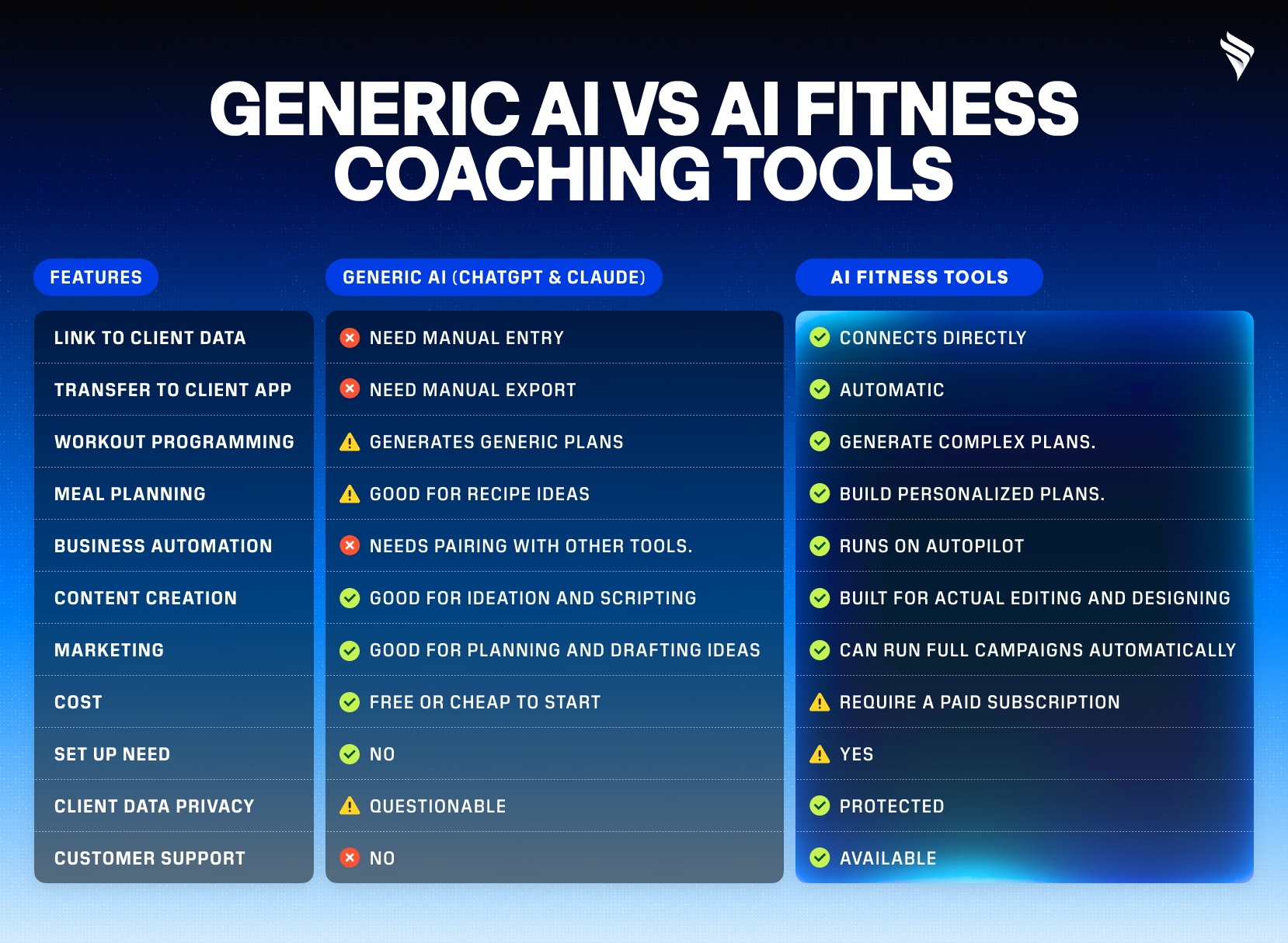
Key takeaway: Generic AI isn’t the weaker option. It’s fast, cheap, and great for a quick draft, but it only becomes useful for coaching once you pair it with your own client data and other tools. Specialized tools cost more and take longer to set up, but they work as a complete system on their own, since client data and delivery are already built in.
AI Tools for Workout Programming
Workout programming is one of the biggest time sinks in coaching, and it’s also one of the first things AI got good at.
ChatGPT and Claude
What it do: Can write you a workout in seconds from any prompts.
Con: It doesn’t know your client. No training history, no injury notes, no equipment list, no read on how their last few weeks went. You either feed it all that context by hand every time, or you get a generic program that isn’t actually built for the person doing it.
Tip: Create a folders that containing client information to use everywhere, and share with AI. But you have to update it regularly.
Everfit AI Workout Builder
What it does: Turns a text-based plan into ready-to-use sets and reps that clients can follow and log in-app. It works with superset, AMRAP, timed, and interval workout. With this tool, PhysioRX was able to cut down programming time for 50 clients in a day down to 3 hours.
Pros: One of the best support you can ask for when migrating between platforms. You can move all your workout in batch to Everfit without the manual set up.
Cons: Technically can’t build a workout or program from a prompt.
Tip: Everfit + Claude or ChatGPT is a powerhouse and useful workflow for many coaches.
ABC Trainerize AI Workout Builder
What it does: Built into the platform and draws on real client profiles, Trainerize AI can suggest workouts planned for the next 3-day.
Cons: Coaches using it report programming roughly 50% faster, but it might struggle with advanced training formats and clients who need a more personalized approach, requiring them to step in manually in the end.
Proxima AI Program Builder
What it does: One of the few tools that can build a full progression and conditioning program from just a prompt.
Cons: Proxima is free AI workout builder, though exporting the program or linking it to a client’s Hevy account requires a paid tier. It also doesn’t connect to a client management system, so you’re manually entering client data each time.
Some tips on using AI for workout programming: These tools are only as good as the client data behind them. None of them replace your eye for form, fatigue, or how a client is actually responding week to week. Treat the output as a draft, and check it before anything goes out.
AI tools for Meal Planning
Nutrition guidance is one of the fastest ways to lose a client’s trust if it feels generic. A meal plan that ignores their preferences, allergies, or schedule gets ignored right back. AI can speed up the building process, but the plan still needs to feel like it was made for that person, not pulled from a database.
Everfit Nutrition Coaching
Best for: Personal trainers who need workout and nutrition all in one place.
Everfit provides a wide range of AI tools in their nutrition system to support creating recipes, building plans, tracking meals, and monitoring progress.
- AI Recipe Builder: Turn text, PDF, or any link into a ready-to-use recipe in the app, helping you import any recipes and migrate from other platforms easily.
- Modify recipe with AI: AI suggests variants for different needs from a standard recipe, such as vegan, low-sodium, low-sugar, shellfish-free, and so on.
- Meal Plan Generator: Build daily or weekly plans matched to a client’s macros and preferences, and can regenerate the following week’s plan based on check-in responses.
- MacroSnap: AI food scanner in the client app. They scan a meal and AI detects ingredients and calculates macros for a quick log.
Sit alongside workouts, check-ins, and messaging, you can manage your whole coaching on Everfit without switching tools. However, Everfit isn’t HIPAA-certified, so it’s built for coaching, not clinical work with dietetic clients.
Promealplan
Best for: Nutritionists and coaches who don’t need workout programming.
Promealplan is built specifically for meal planning. What it can do:
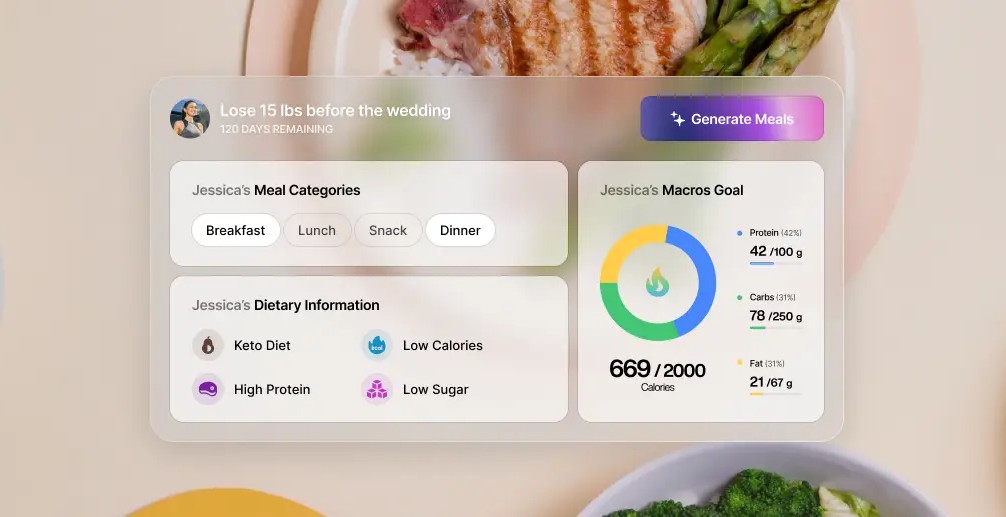
- You set a client’s calories, macros, restrictions, and preferences, and it generates a full plan with portions included, in a few minutes.
- Unlike tools that use AI to write recipes on the fly, Promealplan pulls from a pre-built, dietitian-checked recipe library with around 1,000 options.
There’s no workouts, no in-app messaging, no community building, no on-demand recipes, and no automation. It works better as a dedicated nutrition tool running alongside whatever you use for training.
Some tips on using AI for meal planning: Ask ChatGPT or Claude for recipe ideas around a client’s restrictions or a cuisine they like. Then bring the direction into Everfit or Promealplan to build the structured, macro-calculated version, so you can avoid serving the same five meals to every client.
AI tools for Fitness Business Management
Running the repetitive side of coaching, onboarding, check-ins, reminders, client engagement, and reporting, is where AI and automation earn their keep.
This is also where the best coaching platforms differ from a general AI assistant. Everfit, My PT Hub, and ABC Trainerize are the three platforms doing this well. They offer automations that run by trigger, and AI makes sure the response or insight accurate, so you don’t have to prompt every time.
- AI Push-up Challenge: One of the most-used engagement features. AI counts a client’s reps, checks their form through the camera, and logs the result to a leaderboard, no manual counting needed.
- Smart Response: AI drafts replies to client messages based on chat context, giving coaches full control to review and edit before sending. Drafts reference the coach’s own Knowledge Base and saved responses, so replies sound like the coach, not a generic bot.
- Olly AI assistant (Beta): Ask about any client to get a quick read on their progress, or hand off admin tasks like sending check-ins and scheduling messages, including by voice.
- Check-Ins AI: Let AI analyze a client’s check-in form, summarize their progress, and draft a response in seconds. Sold as an add-on rather than bundled into the base plan.
ABC Trainerize
- Glofox AI Churn Predictor: Tracks attendance and behavior patterns across a member base, flags early disengagement signals, and generates churn risk scores automatically.
Some tips on using AI for business management: A recommended workflow for coaching business is to use Claude or ChatGPT to map our the onboarding calendar, suggest when to have the right nudges, and messaging for a 6-week check-in cadence. Then build that structure into Everfit’s Autoflow or Onboarding Flow to run it on schedule.
Top AI tools for Fitness Content Creation
Unlike programming or nutrition tools, most of these are general creator tools that can support rolling out workout videos, coaching posts, and social content in less time.
Scripting and writing
- ChatGPT or Claude: Best for drafting captions, video scripts, email content, and rough outlines. You still need to edit for your voice, but it gets you from a blank page to first draft fast.
- Jasper: Built specifically for marketing copy, with brand voice memory so your tone stays consistent across posts instead of resetting with every prompt.
Video editing
- Opus Clip: It takes long-form video, like a coaching call, podcast, or full workout session, and automatically pulls out the highlights, reformatting them into short clips for repurposing on social.
- ElevenLabs: It generates natural-sounding AI voiceovers in multiple languages and tones, useful for narrating tutorial videos or dubbing content without being on mic yourself.
- HeyGen: Generate an AI presenter that delivers your script on camera, without you filming. Useful for coaching explainers, onboarding videos, or education content where you want a consistent, repeatable presenter without reshooting every time.
Graphic design
- Canva Magic Design: Covers most of a coach’s graphic needs: quote graphics, promotional images, thumbnails, and branded educational content. From a prompt, it can make on-brand graphics with custom visuals when stock photos don’t fit.
Some tips on using AI for content creation: The strongest workflow chains a few of these together rather than relying on one: Draft the script in ChatGPT or Claude => Use HeyGen, ElevenLabs or record it yourself for voicing => Edit with Opus Clip => Use Canva to build the matching thumbnail and caption graphic.
Top AI tools for Marketing and Lead Generation
Planning a content calendar, figuring out what to post, or crafting an email sequence that doesn’t sound salesy isn’t always second nature for coaches. It’s easy to get stuck: staring at a blank page, unsure what angle to take, or posting the same generic tip because a new idea isn’t coming.
Content calendar planning
ChatGPT or Claude are the most practical starting points. Feed it your niche, audience, and goals, and it can map out content pillars, a monthly calendar, and topic ideas that tie back to what actually converts (client results, common objections, FAQs).
Marketing and outreach campaign
- ManyChat: if you’ve ever seen a post that says “Comment ABC to get [something],” this is the machine behind it. It auto-replies to DMs, turns comments into conversations, and captures new leads across social media. With its AI add-on, replies get less scripted and more dynamic, adapting based on what the person actually says.
- GoHighLevel: An integrated marketing platform with AI-assisted email sequences that personalize follow-ups and nurture leads without writing every message manually.
- HubSpot: CRM with an AI email assistant that helps draft outreach and tracks engagement, plus contact management and pipeline tracking at no cost to start.
Some tips on using AI for Marketing
- Fitness content is also more crowded than ever, generic tips and templated emails blend into the noise fast. Keep in mind that your actual coaching experience, the results you’ve gotten people, the way you talk to clients, is what makes a post or email sound like it’s from you and not a bot.
- Don’t just ask ChatGPT for a calendar and then lose the output in a chat thread. Link it to a workspace like Notion, and it can build and update your calendar directly.
Top AI Tools for Data Analytics
Most coaches have the data, workout logs, check-in responses, nutrition adherence, engagement numbers, but not always the time to dig through it and spot what’s actually going on.
This is where Claude and ChatGPT are genuinely useful: feed them structured data, and they can find the pattern faster than you scrolling through client rows or spreadsheet tabs yourself.
How to use Claude and ChatGPT to analyze coaching data
- Export first, then upload. Pull your data as a CSV or spreadsheet, check-in responses, email performance, social post metrics, whatever you’re trying to understand, and upload it directly into the chat instead of describing it in a prompt.
- Ask specific questions, not vague ones. “Analyze this” gets you a vague summary. “Where in this client journey are people dropping off?” or “Which subject lines got the highest reply rate?” gets you something you can act on.
- Claude is particularly strong at turning data into an actual dashboard. You can have trends breakdowns by weekly or monthly cohort. This is worth trying if you want to see your retention or engagement numbers visually without exporting to a separate BI tool, which most coaches like you and me are not familiar with.
- Use it to spot churn patterns. Describe your client journey step by step (onboarding, first check-in, month two, renewal point) and paste whatever data you have at each stage. Ask where the biggest drop-off is and what’s likely causing it.
- Compare periods, not just snapshots. Upload two exports, say, last month’s and this month’s, and ask what changed to cover more useful insight.
How to tell if it’s the right AI tool
Before adding any AI tool to your business, make sure it doesn’t fall into the same limitations: generic output, no way to integrate with your client context and data, and having to switch between too many tools.
Give the platform a plus if:
- It can connect to your client data, or at least has an import/export function, so you’re not stuck manually typing everything in.
- It lets you review and edit output before it reaches the client.
- The cost actually fits your budget.
A few things that actually move the needle
Tip 1: Build your own knowledge library.
Most coaches use AI with zero context, then wonder why the output feels generic. Put together a simple doc (or folder) with your coaching philosophy, go-to exercise substitutions, common client injuries you work around, your macro-setting rules, and the phrases/tone you use with clients.
Tip 2: Create your own prompt templates.
Instead of writing a new prompt from scratch every time, build 3-4 templates you reuse and tweak:
- Workout template: client goal, training age, days/week, equipment, injuries to avoid, preferred rep ranges → generate program.
- Meal plan template: macro targets, dietary restrictions, meals/day, foods to avoid, prep time available → generate plan.
- Client check-in template: paste their weekly log/notes → summarize progress, flag red flags, suggest talking points for your check-in call.
Tip 3: Keep a swipe file of good AI output.
When AI gives you a genuinely good program, meal plan, or response, save it and notes why this is better than others. Over time this becomes your own reference library so AI knows what’s working.
Wrapping Up
AI takes the repetitive parts off your plate: programming drafts, meal plan starting points, admin, check-in summaries, content ideas, data analytics, so you can spend more of your time actually coaching.
The tools that work best are the ones with real context about your clients, not the ones you have to explain everything from scratch. Whether that’s an all-in-one platform like Everfit, a specialized tool like Promealplan or Proxima, or a general assistant like ChatGPT for content and marketing, the same rule applies: let AI draft, and you decide.
FAQ on AI tools for fitness business
How do trainers use AI to save time?
Mostly by cutting out the manual, repetitive parts of the job. AI can draft a workout program from a client’s goals and history, build a starting meal plan, draft replies to client messages, and handle admin like onboarding and check-in reminders.
Is AI replacing personal trainers?
No. AI can generate a program, a meal plan, or a message draft, but it doesn’t know how a client is actually responding week to week, whether their form is breaking down, what’s going on outside the gym, and how to motivate clients. The coaching judgment still comes from you.
How much do AI coaching tools cost?
Some free AI tools for fitness coaches are ChatGPT and Claude, which provides generic output. Others platforms, such as Everfit, bundle AI into your existing subscription or add-ons, so you can use it with other functions to run your whole coaching.
What are the best AI tools for client retention and engagement?
Everfit covers anything from coaching, running administration, to client engagement, with many AI support. For example, they have AI Push-up Challenge that helps check client’s form, counts the reps, and logs into a leaderboard. This is the most loved engagement tools by Everfit coaches.